
Needs review
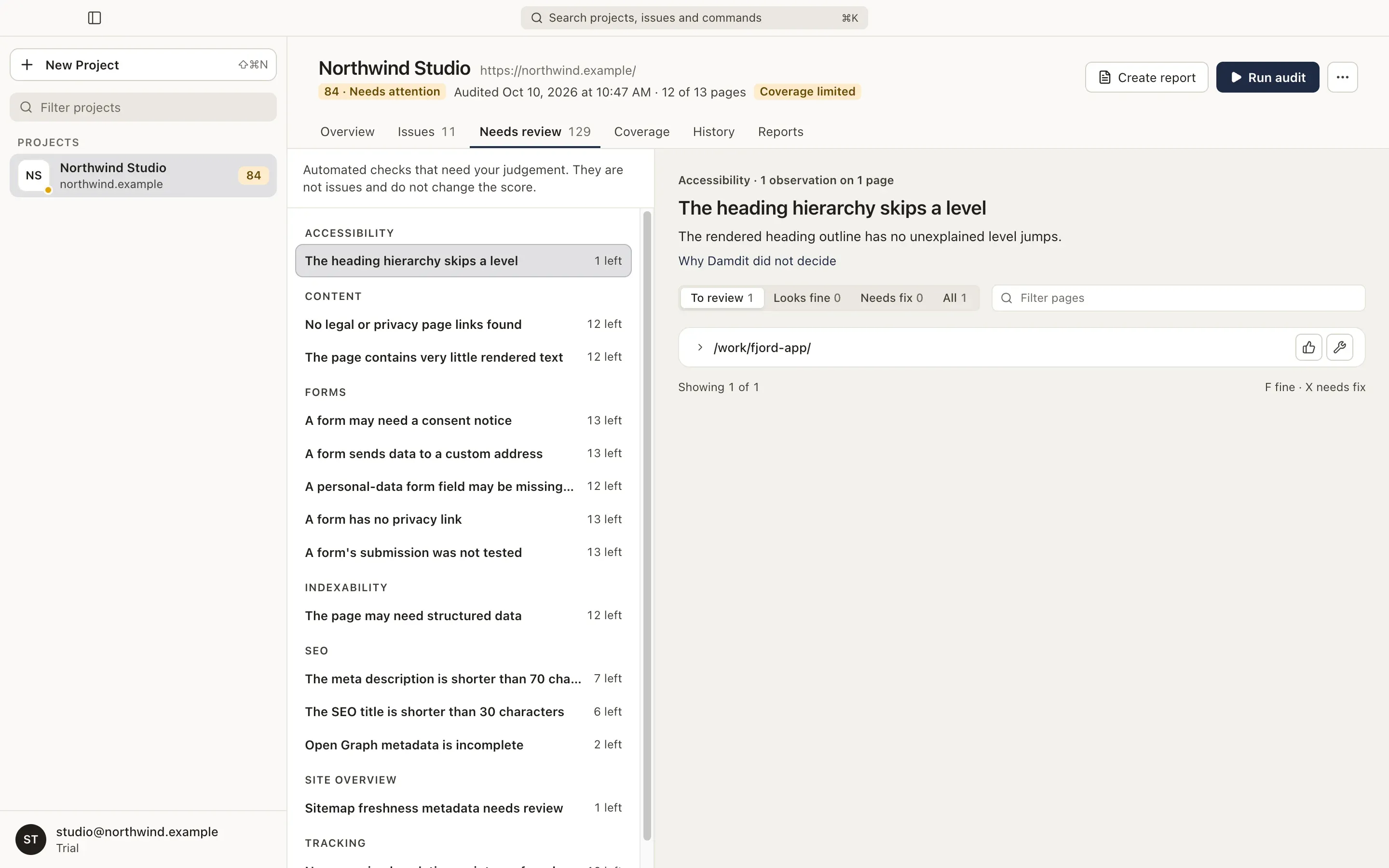
Some checks can’t decide on their own. Is this link text clear in its context? Is this placeholder text intentional? Needs review (⌘3, Ctrl+3) collects these observations for you to judge. They are not issues and never change the score.
Review a check
Section titled “Review a check”The list on the left groups the checks by area, with how many observations each has left. Choose a check to see:
- What to check: what to look for on each observation.
- Why Damdit did not decide: why a person is needed.
- The observations: each page and element, with what was measured. Expand one to see its HTML.
Mark each observation:
- Looks fine (F): nothing to do.
- Needs fix (X): it should be fixed.
Focus moves to the next observation after each mark. Choose the mark again to clear it. When a check has several reasons, Mark N as fine marks a whole group at once.
The switch at the top shows To review, Looks fine, Needs fix or All.
Your marks are kept outside the audit and carry over to the same observation in later audits. They can be changed only on the current audit.
Turn observations into an issue
Section titled “Turn observations into an issue”When you’ve marked observations as Needs fix, choose Add to Issues. Damdit creates one issue for the check, listed under Added from Needs review in Issues. Later audits test those observations again: the issue stays detected while any of them is found, and is resolved when none is.
An issue added from Needs review is not part of the health score either.